


MessagePay: A Simple Way to Make Your Loan Payment
Life gets busy, and sometimes a loan payment can sneak up on you. MessagePay gives you a quick, convenient way to make a payment when you're away from home or short on time.
Fast, Convenient Loan Payments
MessagePay lets you securely make a loan payment by text from your mobile phone. No online banking or branch visit required—just a fast, convenient way to pay from an external account.
A Small Fee That Can Save You More
Each MessagePay transaction includes a $5.99 convenience fee. Compared to a late fee, it can be a cost-effective way to keep your loan payment on track.
Whether you're traveling, busy, or away from home, MessagePay provides a fast, convenient way to make your payment.
Getting Started with MessagePay
Getting started with MessagePay is quick and only takes a few minutes.
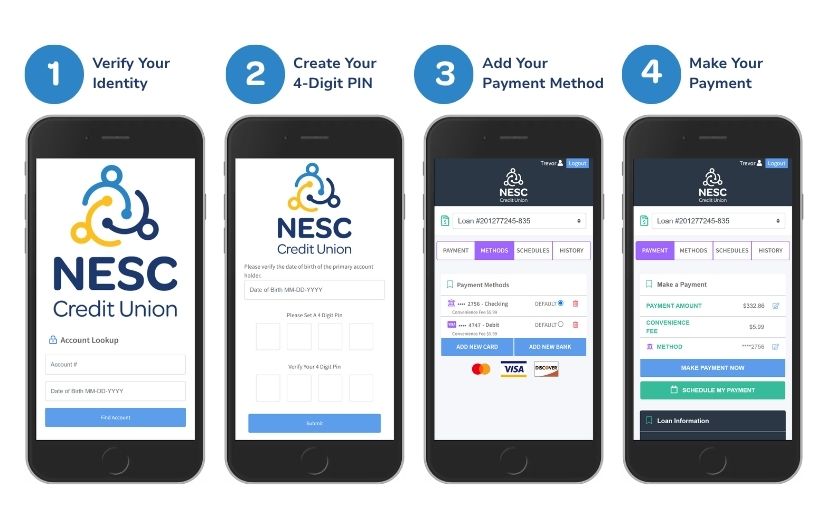
1. Verify Your Identity
The first time you use MessagePay, you'll verify your account by entering your:
- Account Number
- Date of Birth
2. Create Your Secure PIN
After verifying your identity, you'll create a 4-digit PIN. You'll use this PIN to securely confirm future payments, so be sure to keep it in a safe place.
3. Add a Payment Method
Choose one of the following:
- Debit card
- External checking or savings account
Follow the secure prompts to complete setup and return to the payment portal.
4. Make Your Payment
After setup is complete, you can view your eligible loans, select your preferred payment method, and submit your payment in just a few steps.
How Does MessagePay Work?
If you're enrolled in MessagePay, you'll receive a text message when your loan payment is due. The message includes a secure link to your payment options. If you no longer wish to receive text messages, simply reply STOP.
Why Use MessagePay?
MessagePay gives you another convenient way to make your NESC loan payment when you're away from home or short on time.
- Pay by text with a secure link.
- Avoid late fees with a quick payment.
- Protect your information with secure encryption.
- Pay from an external account or debit card.
- Pay only $5.99 per transaction.
- Pay from anywhere using your mobile device.
Frequently Asked Questions
What is MessagePay?
MessagePay is a secure payment service that allows NESC Credit Union members to make loan payments by text message using an external bank account or debit card.
How much does MessagePay cost?
Each payment made through MessagePay includes a $5.99 convenience fee.
Can I pay from another financial institution?
Yes. You can use an eligible external checking or savings account or a debit card.
Is MessagePay secure?
Yes. MessagePay uses encryption and identity verification to help protect your personal and payment information.
Do I need Online Banking to use MessagePay?
No. MessagePay is a separate payment service that allows you to make loan payments without logging into Online Banking.
Can I opt out of MessagePay text messages?
Yes. Reply STOP to any MessagePay text message to opt out.